Know who’s coming.
Simple attending or not attending responses. Schedule club-wide and team sessions, collect attendance responses and give trainers a home for upcoming sessions and reports due.
Thursday training✓ Attending
BUILT AROUND YOUR CLUB
From the training floor to tournament day. Bring your people, events, finances and club operations together in one simple app.
For the people who keep the club running.
6:30 pm · Main training hall
Interactive demo · fictional club
ONE CLUB. ONE PLACE.
Running a club is a team effort. SquadUp keeps the everyday jobs together, so volunteers can spend less time joining the dots.
Simple attending or not attending responses. Schedule club-wide and team sessions, collect attendance responses and give trainers a home for upcoming sessions and reports due.
Members manage contact details, emergency contacts and supporting documents. Admins review everything in one place.
Photograph assets, handle loan requests, allocate equipment and record returns. Record maintenance and asset values, with shared equipment information in club Finance.
Features are available in the evolving club template. Your rollout and integrations are confirmed during setup. Payment records do not execute bank transfers; automatic payment confirmation and device push require connected services.
SIMPLE ON PURPOSE
Members see what they need. Admins use the administration centre; trainers have a dedicated landing page for sessions and reports.
Illustrative demo with fictional details. Club branding and setup are tailored for each club.
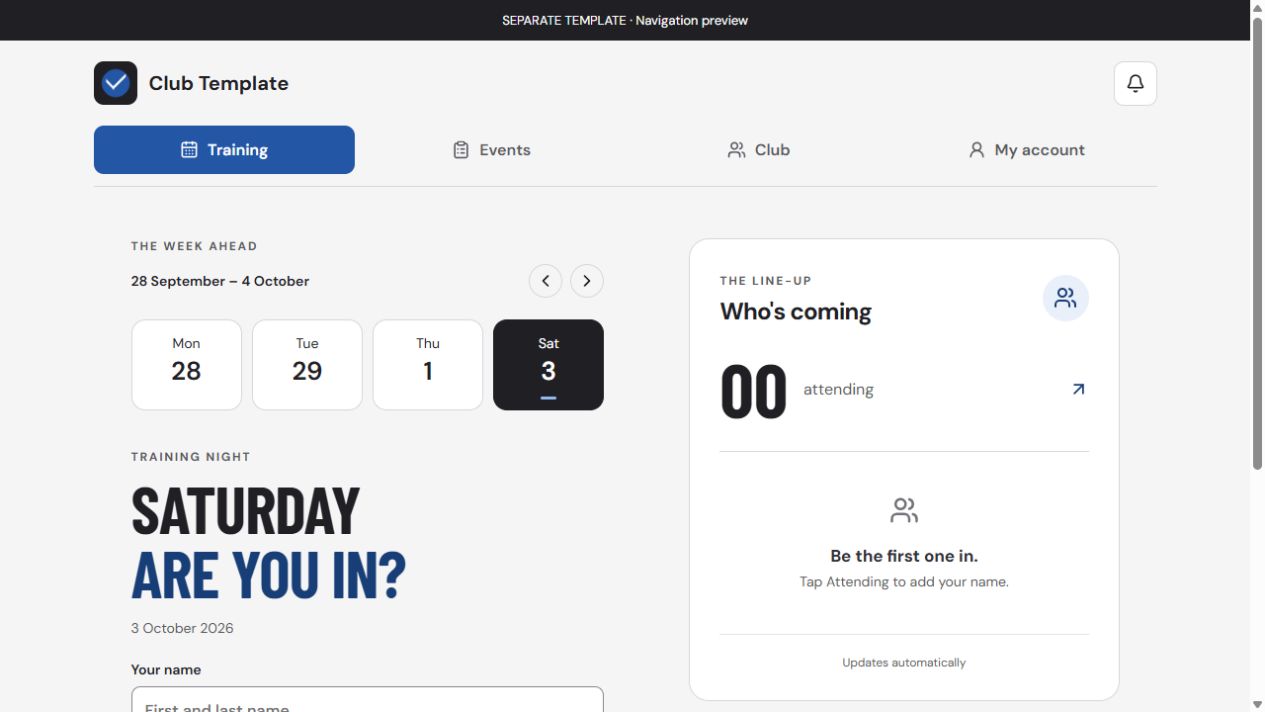
Separate template preview. No real member information is shown.
DIFFERENT CLUBS. SHARED CHALLENGES.
Training attendance, armour loans, tournament RSVPs and insurance evidence. Keep the practical side organised.
Coordinate event plans, shared kit and member details, with a clear place for questions and requests.
Give players, coaches and organisers one home for sessions, equipment and club updates.
Document types and club terminology can be tailored during setup. Tell us how your club works.
FROM FIRST CHAT TO FIRST SESSION
A practical setup process, with an app shaped around your club’s identity and routines.
Talk through your members, training schedule, equipment and the admin you want to simplify.
We configure the branding and club settings, then walk you through a separate preview.
Approve your setup, appoint your admins and invite members to start using your club app.
Pricing is discussed after we understand your club’s needs. Request a demo to explore the app and talk through your setup.
Let’s talk about your clubA FEW GOOD QUESTIONS
SquadUp runs in a web browser. Members can also add the club app to their phone’s home screen on supported devices, without finding it in an app store. An internet connection is required for club data.
No. Members get the four main tabs. Access follows assigned roles. Admins use the administration centre, trainers have their own home screen, and finance, staffing and committee tools are shown to the appropriate roles. General members see training attendance totals rather than other members’ names.
Yes. Your setup can use your club name, logo and colours, with its own training schedule and membership information.
SquadUp records club and event finances, expense approvals, reimbursements and payment statuses. Ticket checkout is designed for Stripe and needs the club’s provider connection. Opening an external payment service does not mark an item paid: record the payment manually or configure a supported API/webhook. SquadUp does not itself execute bank transfers or payroll.
Reports and exports are grouped in one administration area. Select a category such as Finance, then choose the relevant event, expense or general report. Available exports also cover membership, training, equipment and governance records, subject to access permissions.
No. They help your club track uploaded evidence and expiry dates. Event eligibility and any insurance requirements must still be checked against the relevant organiser’s rules.
LET’S GET YOUR CLUB TOGETHER
Tell us a little about your club and what you’d like to make easier.
Our contact address is being finalised. You can prepare and copy your enquiry below; it won’t be sent or stored by this website.